Procedural Art and Design with PaperJS
I use Paper.js in a custom sketchbook repository to generate sketches I can directly print with my DIY budget pen plotter.
Current sketch I’m working on: Principles of Form and Design
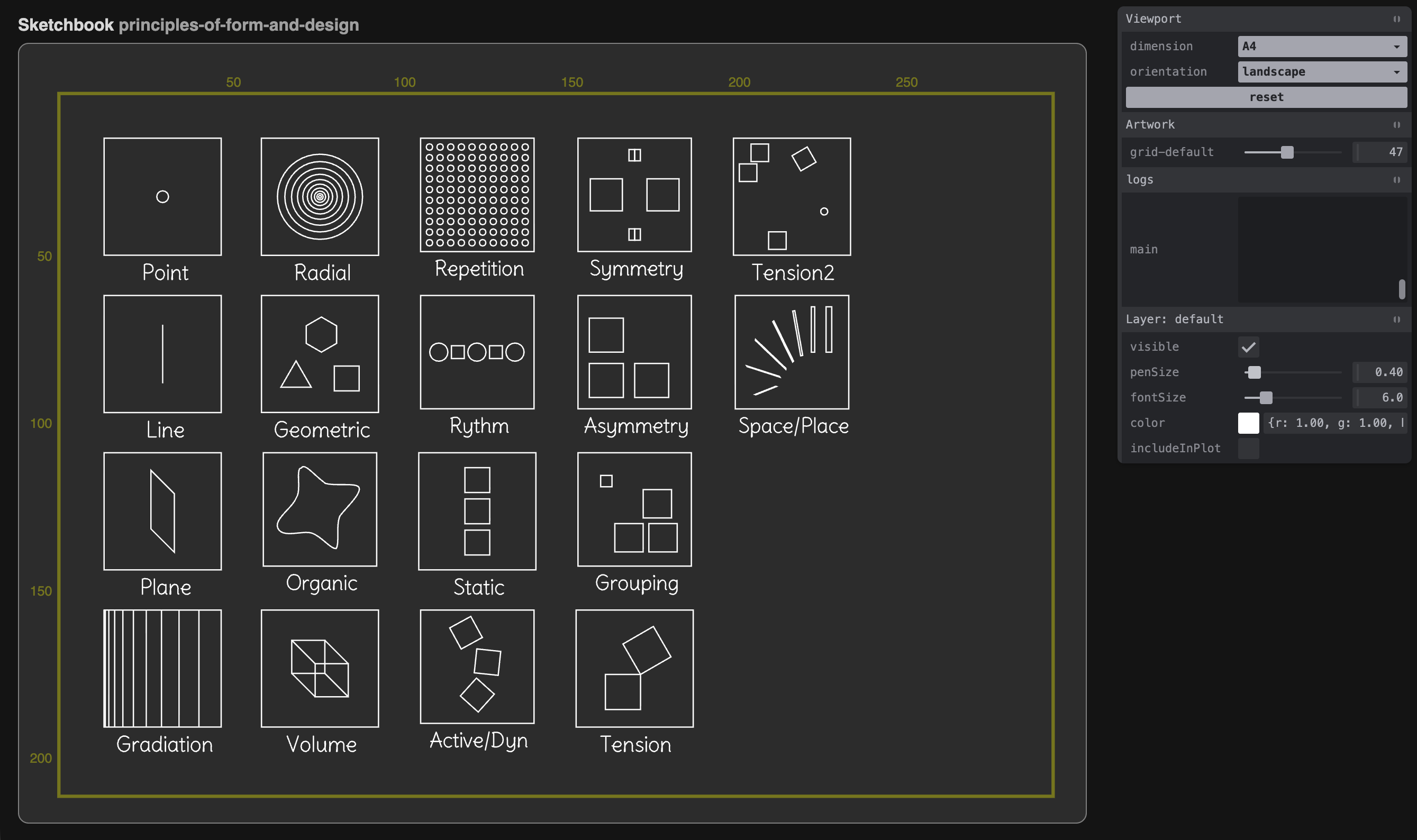
As I will explain below, I need to build a starting point reference to translate common design principles into code so I can see it all in one place and think about possibilities for abstraction to make those concepts available to the end user.
So for starters, after looking for random inspiration by scrolling through https://same.energy/, I often came across these different ‘Principles of Form and Design Posters’ that I have seen before in schools, books, and of course the internet. But to be honest, I never really worked with them or actually played with them; it always seemed so self-explanatory.
For example, this is how the tension piece looks in code. I think the key part is having 2 (or more) touching objects and rotating one on a connecting point.
const createTension = () => {
	const group = new Group();

	const square = new Path.Rectangle({
		center: center.add([-10, 20]),
		size: [30, 30],
	});
	const tensionSquare = new Path.Rectangle({
		position: center.subtract([10, 10]),
		size: [30, 30],
	});

	tensionSquare.rotate(60, square.segments[2].point);

	group.addChildren([square, tensionSquare]);
	return createPrinciple(group, 'Tension');
}
So maybe a derived function here could be something like createTension(path1, path2), which does exactly that. Perhaps that seems a bit simple in that instance - and i am always fighting this thought - but i think on the larger scale it helps keep the code readable as an artistic expression. But there is an absolute chance that it’s really just overthinking.
Now I am still quite early in the process; you can expect me to go into more detail as I’m going along.
Concept: The paperjs-toolbox (working title)
As time moved on and I got a bit more serious about using this library, I started to build up a sketchbook repository where all my experiments and sketches live, so I have a strong base toolset readily available and can start building with typescript, livereload, easy creation of controls, and more by basically just creating a new file.
I think this file-based structure is very neat to prototype quickly. Want to branch the current sketch? Just duplicate it. Now both are instantly available
This is my idea of a usable superset library of Paper.js for others to use to start off stronger. It consists of three parts:
A: Abstracted tools for generative art and design
This is a tough one. On one side, it feels like still, after a year of working with this library, I don’t have much to show for it. I managed to create a few cool artworks by working in concrete directions or using classic algorithms, but more often than not I struggle for some hours just to get some hideous nothingburger.
Here it is important to note that I primarily want to create sketches to penplot. So the only graphical element really available is the line or stroke. So what I actually hope to build is a library with tools for that, like more organic randomized lines or different kinds of fill, for example, hatching.
But then I also came across doing the same boilerplate code, like grids or specific shapes like blobs, over and over again. Basically, these two things I want to build out as a superset of functions for Paper.js.
B: The sketchbook-cli
To make this all more easily available, I think about creating a Node.js-based CLI tool for easy setup of a new sketchbook and also to run the dev server. In the first iteration, I tried this: what I had done was create a tool that almost created a repository similar to my first repo.
I think this is not the way to go to make it really as slick as I imagined, so I guess in the next try I want to have every lib type and class inside the actual lib and just template out the minimal required structure to the new project… even if it is just the package.json with all required dependencies and scripts, some folders, and a small example sketch.
Another feature I think about is bundling the sketchbook or individual sketches to publish them or include them in an existing website for others to play around.
C: The Plotterport
When I started out with this plotting thing, I was using so many tools:
- Sourced SVGs on the internet or created them with p5 and SVG renderer (later paperjs)
- Cropped, scaled, and converted the image to gcode using Inkscape
- As the pen plotter was on a distant table, it was connected to a Raspberry Pi running CNCjs as a gcode sender
So, as you might imagine, going through all these steps was very tedious and seemed unnecessary. My dream was to be able to directly control the plotter from my sketchbook. The goal is to use the plotter more as a device for direct artistic expression, like a brush, being able to quickly pick shapes, patterns, and stuff, selecting a location on the canvas, and pressing go!
Also, I never really got into multicolor prints, as this was such a fumble with the old setup. Having that also directly integrated would make it possible.